Java4Shell CVE-2026-114938: Check and Patch Your JVM
Java4Shell (CVE-2026-114938) is a JDK flaw, not a Spring bug. Check AVX-512 exposure, apply the JVM flag fix and patch Kubernetes images today.
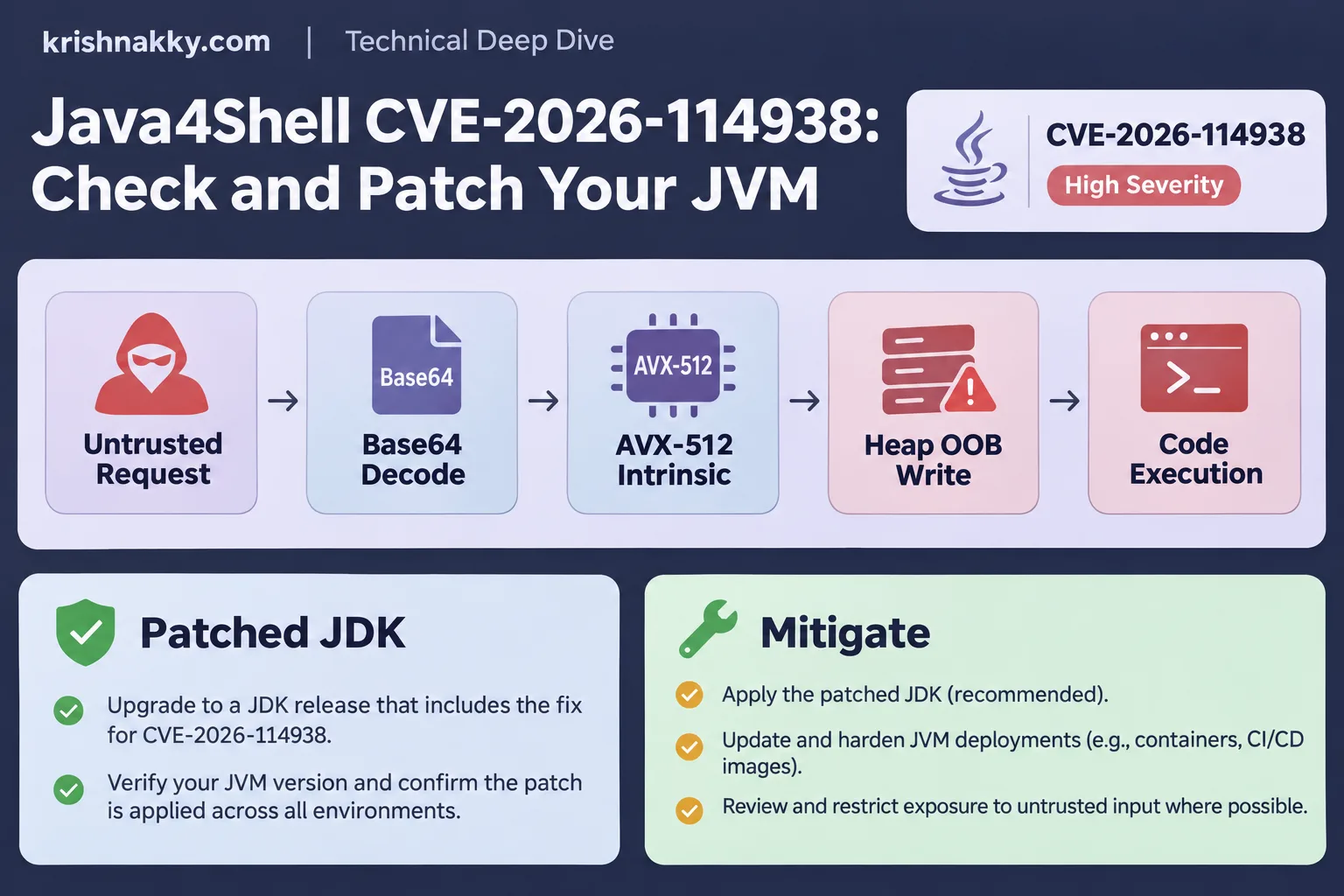
Java4Shell (CVE-2026-114938) is a heap-overflow bug in the JDK's AVX-512 Base64 decoder, and you check and fix it by confirming your JDK build, your CPU flags and the UseBASE64Intrinsics setting, then installing the patched JDK or disabling that intrinsic. Oracle shipped the fix on November 17, 2026. Yesterday I went through every Java service I operate, plus a few I help other teams run, and this post is the checklist that came out of it. The commands are real and copy-pasteable. The fixed build numbers are not, because they differ per vendor: take them from your vendor's bulletin (Temurin, Corretto, Zulu, Red Hat) and paste them into your change ticket yourself.
What the bug is, in short
The JDK ships a hand-tuned machine-code replacement for java.util.Base64 decoding. HotSpot's C2 compiler swaps it in once a method gets hot, and on CPUs with AVX-512 VBMI it processes 64 bytes per step. In affected builds, that routine miscalculates how much it may write, so a crafted input overruns the output buffer on the Java heap. The floor is a JVM crash. With enough effort the overrun can corrupt neighbouring objects, and that is how a crash becomes remote code execution.
Severity depends on who is scoring, and on which scale. Oracle rates it 8.1 under CVSS 3.1, while Calif, the group that reported it, scores it 9.2 under the newer CVSS 4.0 system. Those two numbers are not directly comparable: CVSS 4.0 weighs exploitability and attack complexity differently from 3.1, so a version mismatch alone explains most of the gap, not necessarily a disagreement about the bug itself.
Where things stand today
- Oracle fixed it on November 17, 2026.
- Probing and blind exploitation attempts have been reported by Rapid7 and others. I have not seen a confirmed compromise in the wild.
- HeroDevs noted it was absent from CISA's Known Exploited Vulnerabilities catalogue as of November 17, though CISA still published an alert urging immediate patching.
- The disclosure leaked ahead of the coordinated date, so defenders got less lead time than usual.
My read: mitigate today and patch this week for anything internet-facing. Internal batch jobs on ARM nodes can follow the normal release cadence.
Why a framework upgrade does nothing
Your scanners are tuned for library CVEs, so they will stay quiet here. With Log4Shell, the fix was a version bump in pom.xml. In this case nothing in your dependency tree is vulnerable. Spring Security, Tomcat and Jetty just call java.util.Base64, and the JDK decides how to execute it. You can run the newest Spring Boot with a spotless Software Composition Analysis report and still be exposed because the JDK underneath is stale. That is equally true when you migrate off RestTemplate to RestClient on Spring Boot 4.2: the migration changes your libraries and leaves the JDK alone.
Three layers are involved:
- Your code and Spring libraries call
Base64.getDecoder().decode(...). - The JDK class library forwards to a Java method.
- HotSpot's C2 compiler, after enough calls, replaces that method with the AVX-512 machine code.
The defect is in layer 3. Only a JDK update or disabling the intrinsic touches it.
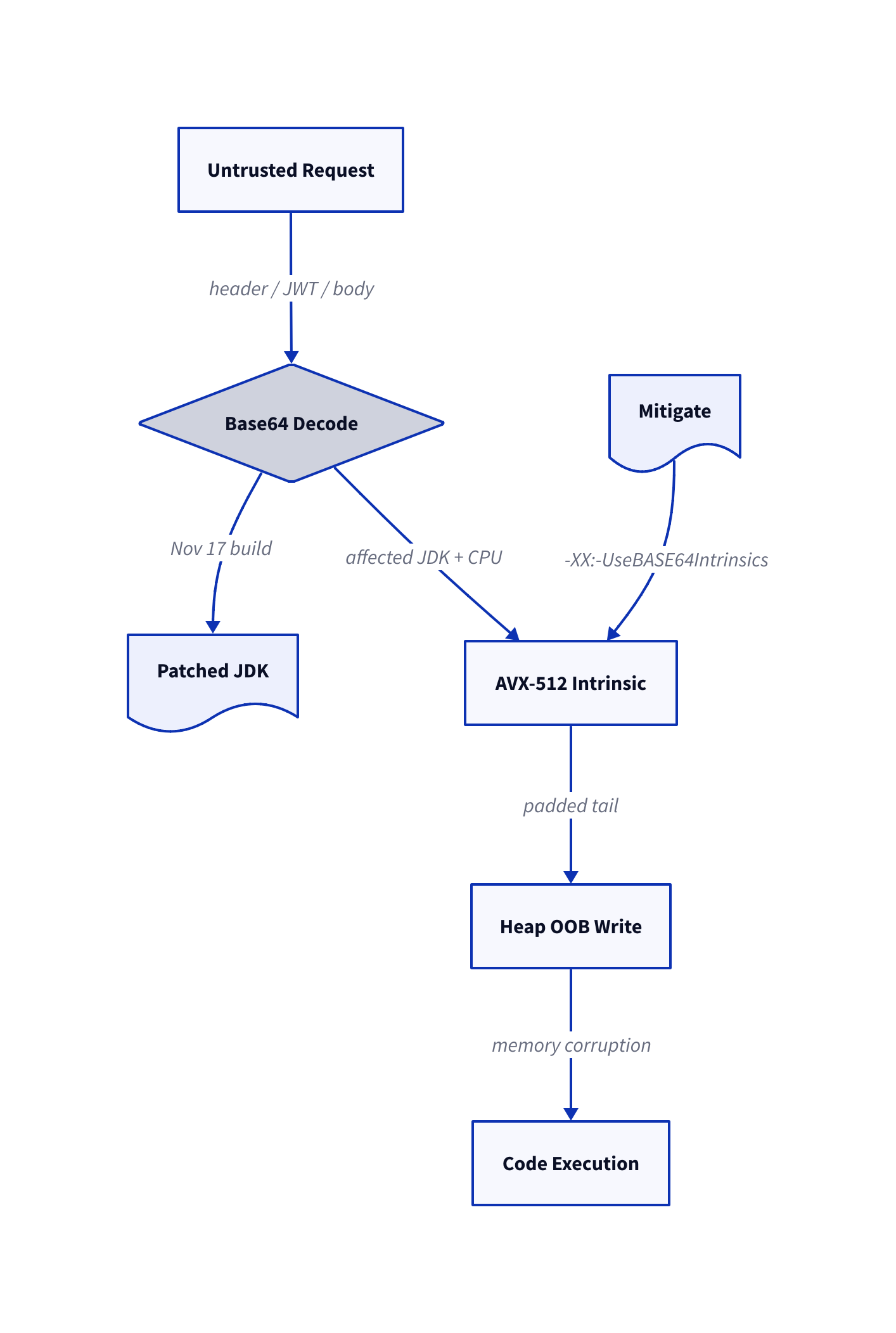
Are you actually exposed? Four conditions
All four must hold:
- An affected JDK. Reports say x86-64 builds from 17.0.6 onward, plus 21, 25 and 27, that predate the November 17 fixes. Confirm exact ranges with your vendor.
- x86-64 architecture. ARM nodes (Graviton, Ampere) never take this code path.
- A CPU with AVX-512 VBMI. Many recent Intel Xeon and AMD EPYC (Zen 4 and later) parts have it; older cloud instance families do not.
- C2 and
UseBASE64Intrinsicsat their defaults. Both are on in a stock server JVM. The code has to get hot enough to be compiled, which an attacker can arrange by sending repeated requests.
Two of those four are hardware facts, so the same image can be safe on one node and exposed on the next. Mixed node pools make this the hardest part of the audit, and there are container-specific wrinkles:
/proc/cpuinfoinside a pod shows the host's CPU flags, not a cgroup-limited view. A container cannot hide AVX-512 from the JVM, and CPU limits do not change which instructions are available.-XX:+UseContainerSupport(on by default) affects how the JVM reads memory and CPU quota, not which vector extensions it uses. Do not count on it to narrow the exposure.- A Deployment without node affinity can have replicas on both AVX-512 and non-AVX-512 nodes. If one replica crashes and others do not, the CPU is the first thing to compare.
- Autoscalers that mix instance families (a Karpenter or Cluster Autoscaler pool with several allowed types, for example) can move a workload onto a VBMI node tomorrow even if today's nodes lack it. Audit the pool's allowed instance types, not only the current nodes.
That node-level thinking is the same you need for GPU scheduling with Kubernetes Dynamic Resource Allocation, where hardware features decide where a pod may land.
Which decode paths can an attacker reach?
An intrinsic matters only if untrusted bytes pass through it. A typical Spring stack has five such places:
Authorization: Basicheaders. Spring Security'sBasicAuthenticationFilterdecodes the header before checking any password, so the attacker needs no valid credentials. Tomcat and Jetty have their own Base64 handling for the same header in some authenticators.- JWT (JSON Web Token) decoding. A JWT is three Base64URL segments, and resource servers decode the header and payload before verifying the signature. A forged token therefore reaches the decoder. Base64URL is a variant with a different alphabet, so check whether your vendor's advisory covers that decoder too. If you expose tools to agents, the same applies to token handling in a Spring Boot MCP server secured with the 2026-07-28 spec.
- Base64 fields in JSON bodies. Any
byte[]field in a Jackson-bound DTO is Base64 on the wire: JSON file uploads, document attachments in payment APIs, signature blobs. Jackson uses the JDK decoder or its own depending on version, so verify rather than assume. - WebSocket frames. The handshake's
Sec-WebSocket-Keyis Base64, and STOMP or custom protocols often carry Base64 payloads. - Outbound TLS to untrusted servers. If your service fetches user-controlled URLs (webhooks, image fetchers), certificate and OCSP data from a hostile server gets decoded on your side. It resembles SSRF (server-side request forgery), and I covered mitigations in Spring Boot 4.1 SSRF mitigation.
Kafka comes up whenever I discuss this. Brokers and clients decode Base64 in SASL/SCRAM and some OAuth flows, and Kafka Connect REST endpoints accept Basic auth. An internal broker is hard to reach, but a Connect worker or a schema registry proxy frequently is not.
Auditing a fleet
I audit in three layers: host CPU, the running JVM, and the images before they run.
Step 1: which nodes have the instruction set?
#!/usr/bin/env bash
# Run on each node, or via a privileged DaemonSet that mounts /proc read-only.
if grep -q 'avx512_vbmi' /proc/cpuinfo; then
  echo "$(hostname): AVX-512 VBMI present -> intrinsic CAN be active"
else
  echo "$(hostname): no AVX-512 VBMI -> this code path is not used"
fi
In Kubernetes, node feature discovery labels (feature.node.kubernetes.io/cpu-cpuid.AVX512VBMI) give the same answer cluster-wide with a single kubectl get nodes -l .... The resulting list is the order in which you hurry.
Step 2: what is the JVM really doing?
The image tag tells you what you built, not what the JVM decided at startup. Ask a live pod:
kubectl exec deploy/payments-api -- java -version
kubectl exec deploy/payments-api -- java -XX:+PrintFlagsFinal -version \
  | grep -E 'UseBASE64Intrinsics|UseAVX|UseAVX512'
UseBASE64Intrinsics = true together with UseAVX = 3 (the level that enables AVX-512) on a VBMI node is the red flag. Record the vendor string from java -version as well, since Temurin, Corretto and Zulu publish fixes on separate schedules, and the same major version can be patched at one vendor and not at another.
Step 3: scan every image, not only the running ones
Cron jobs, batch workers and rarely deployed services are where old JDKs hide. Pull the image list from the cluster, then read each JDK's release file:
kubectl get pods -A -o jsonpath='{range .items[*]}{.spec.containers[*].image}{"\n"}{end}' \
  | sort -u > images.txt

while read -r img; do
  echo "== $img"
  docker run --rm --entrypoint sh "$img" -c 'cat $JAVA_HOME/release 2>/dev/null | grep -E "JAVA_VERSION|IMPLEMENTOR"'
done < images.txt
Distroless images have no shell, so for those I extract the release file with crane export or read it from the SBOM. Which leads to the lasting lesson, further down.
Interim mitigations, in order of preference
If the patched JDK cannot ship today, these are ranked by how little they hurt:
-XX:-UseBASE64Intrinsics. This turns off exactly the vulnerable optimisation, and the JVM falls back to the plain Java decoder. Base64 is rarely where a service spends its time, so the cost is usually small, but measure it on your own workload: run a representative load test with and without the flag and compare p99 latency and CPU. It is the most targeted fix.-XX:UseAVX=2. This stops HotSpot from emitting AVX-512 for anything: JIT-compiled loops, array intrinsics, String operations, and crypto stubs such as AES and SHA. It is the blunt option. Services that are crypto-heavy (TLS termination inside the JVM, signing, hashing large payloads) or that do bulk numeric and array work can see a measurable slowdown, so benchmark before rolling it fleet-wide. I use it only where I cannot confirm that the specific flag works on an older build.- Edge input limits. Cap header size (for example 8 KB at the ingress), request body size, and reject
Authorizationheaders beyond a sane length. This does not fix the bug, because a small input may still trigger it, but it narrows the attacker's room. It is a speed bump, not a wall.
In Kubernetes the flags travel via JAVA_TOOL_OPTIONS, so nothing needs rebuilding:
containers:
  - name: payments-api
    image: registry.internal/payments-api:2026.11.2
    env:
      - name: JAVA_TOOL_OPTIONS
        value: "-XX:-UseBASE64Intrinsics -XX:UseAVX=2"
I set both flags together as a temporary belt-and-braces measure, then remove them once the JDK is patched, so nobody inherits mystery tuning flags a year later. Put a comment and a ticket reference beside the line.
The rollout: rebuild, then roll
The permanent fix is a patched JDK in every image. My sequence:
- Bump the base image. Change
FROM eclipse-temurin:21-jre(or your distribution's equivalent) to the patched tag, and pin by digest once you have verified it, for exampleFROM eclipse-temurin:21-jre@sha256:<digest>. A floating tag that silently changes underneath you is how surprises arrive. - Rebuild every service, including those whose code did not change. CI should build from one shared base image so a single commit fixes the fleet. Rebuild the shared base first, then the services that inherit from it.
- Roll Deployments carefully. A PodDisruptionBudget (PDB, which limits how many pods may be down at once during voluntary disruptions) keeps capacity up while pods restart:
apiVersion: policy/v1
kind: PodDisruptionBudget
metadata:
  name: payments-api
spec:
  minAvailable: 80%
  selector:
    matchLabels:
      app: payments-api
Combine it with maxUnavailable: 0 and maxSurge: 25% in the Deployment's rolling-update strategy, and with a readiness probe that waits for JIT warm-up on your hot paths if you have latency targets. For stateful brokers, roll one at a time and watch under-replicated partitions between steps.
- Verify after rollout, not only before. Re-run the
java -versioncheck against live pods, because a stale ReplicaSet or an image cached on a node can leave an old JDK running.
Internet-facing workloads on AVX-512 nodes go first. ARM nodes and internal-only batch jobs follow at the normal cadence.
Two earlier projects shaped how I sequence this. At AirAsia, with traffic around 130 million requests a day, the lesson was never to roll everything at once; a canary slice exposes regressions cheaply, as I describe in building microservices at 130 million requests per day. On the trading and market-data systems I run, such as the deterministic market-data replay engine on QuestDB, the constraint is different: restarting a JVM mid-session costs something real, so patch windows must be planned around market hours. For more on the systems I have built, see my experience.
The lasting lesson: your SBOM must include the JDK
An SBOM (Software Bill of Materials) is a machine-readable inventory of what ships inside your software. Most teams generate it from the Maven or Gradle dependency graph. That graph has no entry for the JDK, and Java4Shell is exactly the kind of flaw such an inventory cannot see.
Three things changed in how I think about this:
- JIT intrinsics and CPU-specific paths widen the attack surface. What executes depends on the processor a pod lands on, not just the artefact you shipped. Two identical pods can carry different risk, so inventories should record runtime facts such as CPU features next to versions.
- The JDK build is a first-class component. Put vendor, version and build number in the SBOM and alert on them. CycloneDX and SPDX can both describe it; the work is making CI emit the entry.
- Regulation is catching up. For teams under DORA (the EU Digital Operational Resilience Act) or NIS2 (the EU network and information security directive), "we patched our libraries" is an incomplete vulnerability-management answer. Auditors increasingly ask about runtime and platform components, and an SBOM that lists the JDK plus a dated record of when each image was rebuilt is the evidence they want. I wrote about automating that evidence in DORA and NIS2 policy as code for Spring Boot and Kubernetes.
My checklist for today
- Label nodes with AVX-512 VBMI and list which workloads land on them.
- Pull the running JDK version and flags from each production pod.
- Apply
-XX:-UseBASE64Intrinsicsto internet-facing services you cannot patch immediately. - Tighten header and body size limits at the ingress.
- Rebuild images on the patched JDK from the vendor you confirmed, then roll with PDBs.
- Add the JDK build to your SBOM and set an alert on it.
- Remove the temporary flags after the rollout and record the change.
If you want a second pair of eyes on a fleet audit or a rollout plan, reach me through the contact section.
Related Articles
- Kubernetes Dynamic Resource Allocation for GPU Spring Boot AI microservices
- DORA and NIS2 policy as code for Spring Boot and Kubernetes
- Spring Boot 4.1 SSRF mitigation and gRPC auto-configuration
Start now: run the /proc/cpuinfo check on one production node, record the result in your incident ticket, and set the temporary JVM flags on your most exposed service before you close your laptop today.
FAQ
What is Java4Shell (CVE-2026-114938)?
It is a memory-corruption flaw in the Java runtime itself, in a speed-optimised routine that decodes Base64 text on certain modern Intel and AMD processors. A crafted input can write past the end of a memory buffer, which can crash the program or, in the worst case, let an attacker run code.
Does upgrading Spring Boot, Tomcat or Jetty fix it?
No. The bug lives in the Java Development Kit (JDK) that runs your application, not in the framework libraries. Only installing a patched JDK build, or switching off the affected optimisation, closes it.
How do I know if my servers are exposed?
You need three things at once: an affected JDK version, a processor that supports the AVX-512 VBMI instruction set, and the default Java settings that enable the optimised Base64 routine. Check the CPU flags in /proc/cpuinfo and the output of java -version on each host or container.
What can I do if I cannot patch the JDK today?
Start Java with -XX:-UseBASE64Intrinsics to turn off the optimised routine, or with -XX:UseAVX=2 to stop it using AVX-512. Limiting request sizes at your edge proxy adds a further layer of protection until the patched JDK is rolled out.